
Save TikTok Videos on iPhone Without Installing Anything
Paste link. Save it on iPhone.
Downloading TikTok videos on iPhone used to mean one of three bad options: TikTok's own save button (hello, watermark), a third-party app (hello, subscription pop-ups and App Store review roulette), or a shortcut that breaks every other iOS update.
There's a fourth option, and it's the simplest: your browser. GoTikSave TikTok video downloader runs entirely in Safari. No app to install, no shortcut to maintain, no profile to trust. Paste a link, download the video without watermark, and put it exactly where you want it.
Open TikTok or Douyin → Share → Copy Link.
Paste the link into the box and hit Download.
Save HD without watermark, SD, or MP3 audio only.
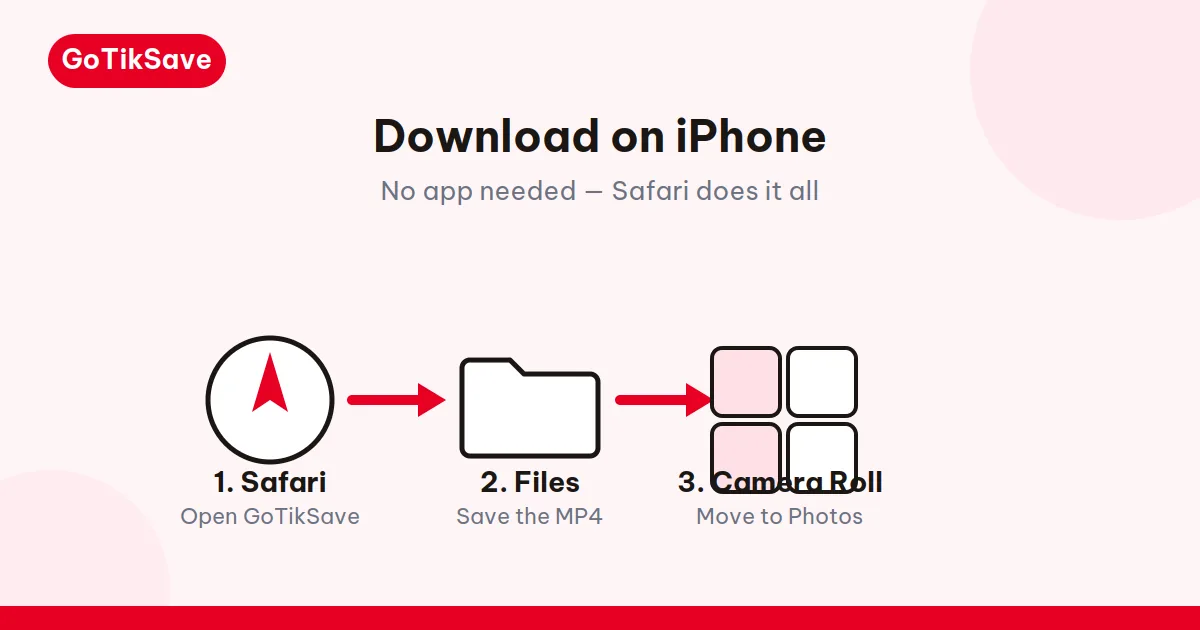
The 3-step iPhone flow
1. Copy the video link in the TikTok app.
Open the video, tap Share (the curved arrow on the right), choose Copy Link.
2. Paste it here in Safari and hit Download.
Open this page in Safari, paste the link, tap Download. Pick "Download MP4 (No Watermark)" in full source quality.
3. Long-press the download button and choose "Download Linked File."
This is the step everyone misses. On iOS, a normal tap on a cross-origin file link usually opens a fullscreen video player instead of downloading. The long-press forces Safari to save the actual file. Once it finishes, the video sits in your Files app under Downloads — from there, one Share → Save Video moves it into Photos. The full camera-roll walkthrough is on our how to save TikTok videos to your camera roll page.
Why the long-press matters: Safari's download quirk
This deserves its own section because it's a common reason iPhone users think a downloader is broken when it isn't.
The video file lives on TikTok's CDN — a different domain from the downloader page. When you tap a link to a file on another domain, iOS Safari's default behavior is to navigate to it, and since it's a video, Safari opens its fullscreen player. You can watch it there, but nothing is saved. The long-press context menu bypasses navigation entirely: "Download Linked File" tells Safari to fetch the URL as a file download instead.
This isn't a GoTikSave quirk. It applies to every browser-based downloader on iOS, because it's Apple's behavior, not ours. Once you know it, it's muscle memory: long-press, Download Linked File, done.
Safari, Chrome, or anything else: iOS browsers compared
Short version: it doesn't matter which browser you use on iPhone.
Apple requires every iOS browser to use WebKit — the same rendering and networking engine as Safari — under the hood. Chrome, Firefox, Edge, and Brave on iPhone are all Safari wearing different icons for downloads. The long-press trick works identically in all of them, files land in the same Files app, and the Share → Save Video path to Photos is the same.
So use whichever browser you already have open. There's no "best browser for downloading on iPhone" — under the hood, every iOS browser runs the same WebKit engine, so they all download identically.
iPad works exactly the same way, with the same steps on a bigger screen.
Storage and file sizes: what to expect
A 30–60 second 1080p TikTok MP4 typically weighs 5–20 MB. A three-minute video can hit 40–60 MB. iPhones handle this fine — even a 64 GB model holds thousands of short clips — but two things are worth knowing:
- Files app vs Photos duplication. If you download to Files and then Save Video to Photos, you now have two copies. Delete the Files copy afterward if storage is tight.
- iCloud Photos. Videos saved to Photos sync to iCloud if you have it enabled, which means a big download session can quietly eat mobile data. Download on Wi-Fi when you can.
Because GoTikSave runs in a browser tab rather than as a native app, it uses no background battery and no background storage once you close the tab. No tracking SDKs, no background refresh, nothing phoning home.
Clearing Safari history won't delete your downloads
Worth knowing because it surprises people: wiping Safari's history and website data does not touch the Files app. Your downloaded videos live in Files → Downloads as ordinary files, completely separate from the browser's data. So if Safari starts acting up and you clear everything to fix it, the videos stay put. The reverse is also true — deleting the file from Files doesn't clear any browser trace, because there isn't one. The browser and the file system are two separate buckets on iOS, and downloads only live in the second.
Douyin links and private videos on iOS
Douyin. Switch to the Douyin tab and paste the share link. The iPhone flow is identical — long-press included. Our Douyin video downloader explains Douyin's link formats.
Private videos. No tool can fetch them, on iPhone or anywhere else. If a video is private, deleted, or region-blocked, you'll get a clear error instead of a broken file.
When iPhone itself blocks the download
Sometimes the tool works fine and iOS is the obstacle. Three iPhone-specific gotchas, in order of how often they bite:
iCloud Private Relay. If you pay for iCloud+, Private Relay routes Safari traffic through Apple's relay servers to hide your IP. Most of the time that's invisible — but it can make TikTok's CDN serve you a slower edge node, or in rare cases refuse the connection entirely, which surfaces as a download that starts and stalls at 0%. If downloads consistently stall in Safari but work in Chrome on the same phone, try toggling Private Relay off temporarily (Settings → [your name] → iCloud → Private Relay). You can turn it back on after.
Content blockers. Safari extensions like AdGuard or 1Blocker occasionally classify the CDN download as a tracker request and kill it silently. The symptom: you long-press, tap Download Linked File, and nothing happens — no error, no file. Disable the content blocker for this site (the "aA" menu → Turn off Content Blockers) and retry. This is a blocker false positive, not a tool failure.
Silent storage exhaustion. iPhones don't warn you clearly when storage hits zero during a download — Safari just abandons the file. If downloads die without explanation, check Settings → General → iPhone Storage before blaming the tool. A single gigabyte of headroom fixes it.
None of these are GoTikSave problems, which is exactly why they're worth knowing: the fix is in your phone's settings, not in retrying the download.
Frequently asked questions
Why does tapping the download button open a video player instead of downloading?
Because the file sits on TikTok's CDN, a different domain from this page. iOS Safari's default behavior for cross-origin file links is to navigate to them, and a video URL opens the fullscreen player. Long-press the button and choose "Download Linked File" to force an actual download. This is Apple's behavior, not a bug in the tool.
I'm on the latest iOS — is the long-press step still needed?
Yes. Apple hasn't changed this behavior across recent iOS versions. Every current iOS still opens cross-origin video links in the player on a normal tap. Until Apple changes it, long-press remains the reliable move.
Does it matter whether I use Safari or Chrome on my iPhone?
No. Apple forces all iOS browsers to use the WebKit engine, so Chrome, Firefox, and Edge on iPhone download exactly like Safari. Use whichever you already have.
How much storage does a downloaded TikTok take?
Roughly 5–20 MB for a typical 30–60 second 1080p clip; longer videos scale up proportionally. If you also move the file from Files to Photos, remember you now have two copies — delete the Files original if space is tight.
Can I AirDrop the downloaded video to my Mac?
Yes, once it's in Photos. Open the video, tap Share, choose AirDrop, pick your Mac. It transfers at full quality with no watermark, ready to drop into any editor.
Safari says "Download Failed." What now?
First, check the link is still valid — open it in the TikTok app. If the video plays, retry the download once; CDN hiccups happen. If it fails twice identically, the video is likely private, deleted, or region-blocked, and no downloader can fetch it. Also confirm you're long-pressing the button rather than tapping it — a tap that opens the player is not a failed download.